Logo Design
Should I design a logo in Canva? The short answer is yes - you can. But the longer answer is, it depends.
If you’re working for a company, we’d recommend getting the logo designed professionally. Now that you understand more about typography, kerning, and graphic devices, you’ll notice that the most polished and effective logos are often minimal, elegant, and deceptively simple. Behind that simplicity is a lot of careful crafting to distil an idea into its purest, most recognisable form.
The reason logos lean towards simplicity and elegance is because they need to work in many different formats: tiny embroidery on a shirt, a favicon in a browser tab, or a huge billboard. That’s why professional logos are delivered as vector files. Vectors don’t use pixels; instead, they’re created with paths, shapes and gradients, meaning they can scale up or down without ever losing quality. But because of this, logos can’t rely on heavy textures, or overly complex elements. Clean, bold, and high-impact always works better.
Tip: Canva doesn’t allow you to create custom vector files — which is one of the key reasons it’s worth hiring a professional designer. They can supply you with proper vector source files, ensuring your logo is scalable, versatile, and ready for any use.
The favicon test
Two marks for the same fictional business. One has been distilled; the other hasn’t. Drag the slider down to 16 pixels — the size of a browser tab — and watch what happens.
Detailed
Distilled
Once you start training your eye, you’ll never look at the world the same way again. Storefronts, websites, adverts—you’ll spot weak logos instantly!
A strong logo should be:
- Easily recognisable at a glance
- Usable at both small and large sizes
- A distilled expression of the brand’s identity through typography, colour, and possibly a supporting graphic device
Like typography, logo design is its own specialist skill. For a company identity, it often involves in-depth research, testing, and stakeholder input.
That said, if you need to put something together quickly for a start up or small business, a simple typographic logo can do the job. Apply what you know about typography, kerning, tracking, and colour to achieve a clean and professional result. Just beware of stock icons and graphics—they’re overused and can cheapen the brand. Experienced designers know how to manipulate and customise elements to create something unique.
How much should you invest in a logo?
That’s like asking “how long is a piece of string?” It can depend on how established your business is, or what the future vision is.
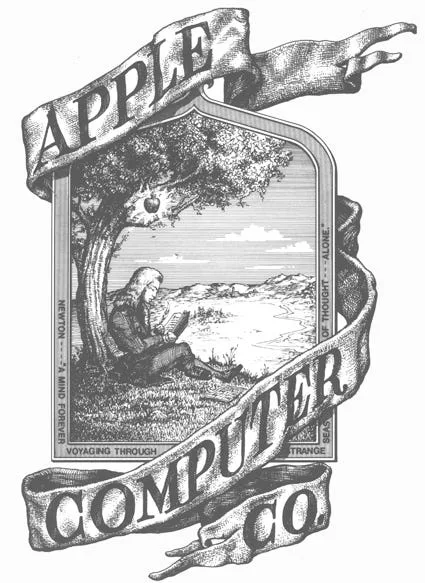
Don’t forget this was the logo that Apple started with:
Ideally, your logo files should include:
- Vector format (e.g. EPS, or AI)
- Transparent PNGs
- Black, white, and inverse variations
These are usually packaged as part of a brand guidelines document, which also explains how the logo should be used across different formats. And in today’s digital-first world, that means checking how it works everywhere—from a round Instagram profile to a wide website header.
Example of different formats: